 Skip to content

Blog
Discover our WooCommerce & WordPress Tips & Tricks.
-
WooCommerce Checkout Blocks: Pros, Cons and Limitations
Wondering about WooCommerce checkout blocks pros and cons? Well, WooCommerce is undergoing a significant evolution with its move toward a block-based architecture, powered by React. This shift promises greater customisation and performance, allowing store owners to create seamless checkout experiences without needing advanced coding skills. By leveraging modern JavaScript frameworks, WooCommerce developers – like those…
-
WooCommerce Custom Development: Build a Scalable Online Store
Outgrowing a default WooCommerce setup is inevitable for serious businesses. While off-the-shelf themes and plugins offer a quick start, they often fall short on performance, scalability and flexibility. Custom WooCommerce development gives you full control over your store’s infrastructure, enabling faster load times, streamlined operations and a tailored user experience built for conversions. Whether you’re…
-
WooCommerce Custom Theme Development: Build a Unique Store
Your WooCommerce store’s design isn’t just about aesthetics – it directly impacts performance, user experience and conversions. While default themes offer a quick start, they often come with bloat, design limitations, page layouts that may not fit your needs, and unnecessary features that slow down your site. Site speed is crucial for WooCommerce sites, as…
Featured Posts
-

Switching from WooCommerce Multisite to a Single Site
This post details my experience with moving a live site from WooCommerce Multisite setup with two top level domains (TLDs) to one single TLD. Throughout the process I referenced these two articles for help, but I found that they were both incomplete for my purposes; one from deliciousbrains.com and one from wpmudev.org.
-

WooCommerce Multisite SEO Regional Targeting
For SEO WooCommerce purposes, you realize you need to target multiple regions so you have better visibility in search engines. That means you need to duplicate the same website on two different network sites within a WordPress Multisite setup. The goal of each site is to target a set of users in a different region…
-
How to Create a WooCommerce GeoIP Multisite Store Notice
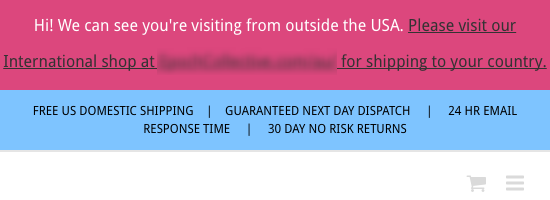
What if you wanted to use WooCommerce, GeoIP and Multisite to display a store notice based on a visitor’s IP address, but no plugin exists for it? That’s the situation I found myself in recently. One option is to develop a plugin for it, like I do all the time for such cases. But, I…